
The morning check-in, without the meeting
Each person gets a direct message at a sensible local hour. The answers land as one formatted summary in your channel, so nobody sits through a call to hear what they could have read in a minute.
- Your own questions, not a fixed template
- Per-person timezones, so nobody is asked at midnight
- Blockers highlighted, people on leave skipped rather than nagged
- A private nudge for whoever has not filed by report time

Every standup carries fourteen days of completion, so a schedule that is slipping says so before anyone goes looking.
Introduce the people who never talk
Pick a channel and a cadence. Everyone in it gets paired and introduced in a group message, and the pair settles on an hour that works for both of them rather than trading messages about it.
- Never repeats a pairing until everyone has met
- Groups of two to eight; an odd one out joins a three rather than sitting out
- Hours that suit both timezones, picked with a button
- Zoom books the meeting at the hour they agree
- Asks afterwards whether they actually met

Settings on the left, the Slack message they produce on the right, updating as you type.
Praise that means something because it runs out
Everyone gets a handful of tokens a day to give away, and unused ones do not carry over. Scarcity is the whole mechanic: unlimited praise is worth nothing, and a daily budget is what makes people actually spend it.
- Pick your own token and daily amount
- Resets at midnight in each person's own timezone
- Leaderboards for giving, not only for receiving

Set the token and the allowance, and see the message your team will get.
One person per feature, not one admin for everything
Most tools give you admin or nothing, so the person who should own the standups ends up holding the API keys as well. Here a grant is per feature.
- The team lead runs the standups
- Someone in HR runs coffee chats and kudos
- Neither can mint an API key or publish your standups at a public URL
- The installer always counts as an admin, so a workspace cannot lock itself out

Press a chip to hand a feature over. Press it again to take it back.
What your team actually sees
Three messages, which is the whole product from where your team sits. Nobody has to open a dashboard to take part.

Rebuilt in markup for this page rather than screenshotted, so no real workspace's messages are shown.
The tools the meeting would have used
A coffee chat can carry a real room. Standups can land in Slack or Google Chat. Nothing here is a screenshot of a partnership: these are the platforms the code actually talks to.
Two minutes hosted, or about twenty on your own servers
Add it to Slack
The Add to Slack button installs Morgenruf on the free hosted instance CloudDrove runs. It takes about two minutes, and whoever installs it becomes the first admin.
Or put it somewhere of your own
The same MIT code runs with Helm on a cluster you already have, or Docker Compose on a small VPS or a spare Mac. It needs Postgres and an HTTPS URL Slack can reach (a Cloudflare tunnel is enough), and a Slack app created from the manifest in the repo.
Point it at a channel
Set the questions, the hour and who takes part. Turn on coffee chats and kudos when you want them; they are off until you do.
Three subscriptions, or one thing you host
A thirty person team typically pays for standups, pays again for introductions, and pays a third time for recognition. This table sticks to what is structural, because feature lists age badly.
| What you get | Morgenruf | Standup tools | Pairing tools | Recognition tools |
|---|---|---|---|---|
| Async standups | Yes | Yes | No | No |
| Coffee chat introductions | Yes | No | Yes | No |
| Peer recognition | Yes | No | No | Yes |
| Runs on your own servers | Yes | No | No | No |
| Source you can read and change | MIT | Closed | Closed | Closed |
| Your standup data lives in | your database, if self-hosted | their cloud | their cloud | their cloud |
| AI assistant access (MCP) | Included | No | No | No |
| Price for thirty people | $0 | per seat, monthly | per seat, monthly | per seat, monthly |
Deliberately not naming per-seat prices here: they change, and a stale number in a comparison is worse than none.
Morgenruf's own standup
The same questions the bot asks your team, answered about itself. No dates: the order follows what people ask for, and asking moves it.
- YesterdayShipped and running
Polls 1.9.14
Ask the channel with
/morgenruf poll. Vote with buttons, watch the bars move, or keep results hidden until close. Anonymous votes cannot be tied to anyone once the poll closes, not even by us.Anonymous pulse and eNPS 1.9.14
A two-tap weekly check-in by DM, with eNPS every fourth week. Only counts are kept, who answered is deleted when it closes, and results show as team figures from 5 answers. Admins included, nobody sees what one person said.
Celebrations 1.9.0
Birthdays and work anniversaries in a channel, moved to the last working day before a weekend or company holiday. How it works
Member profile 1.9.0
Birthday (day and month, never the year), start date, role and location, filled in from Slack or the dashboard.
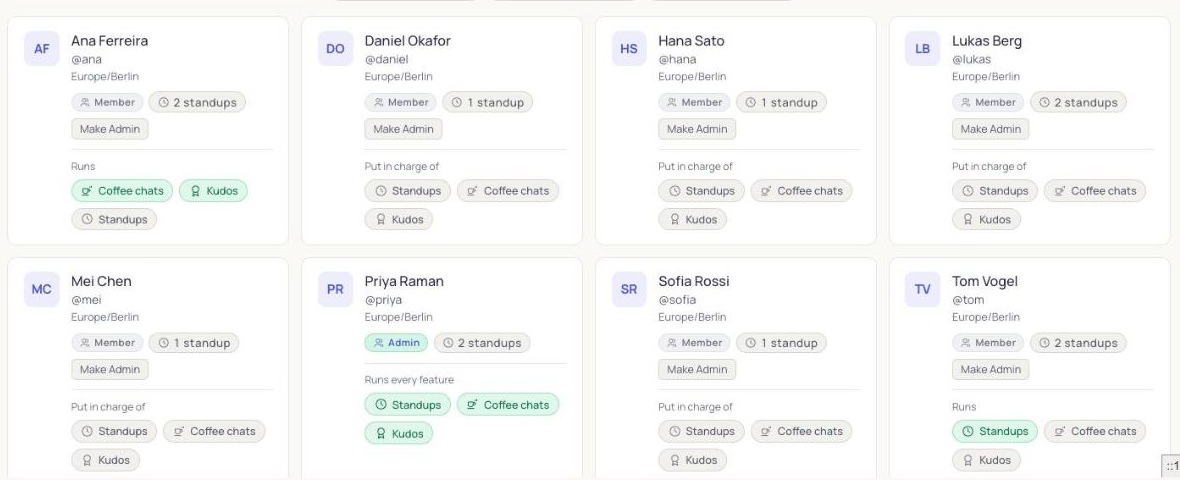
Per-feature admins 1.8.0
One person owns standups, another owns coffee chats. Neither gets the whole workspace.
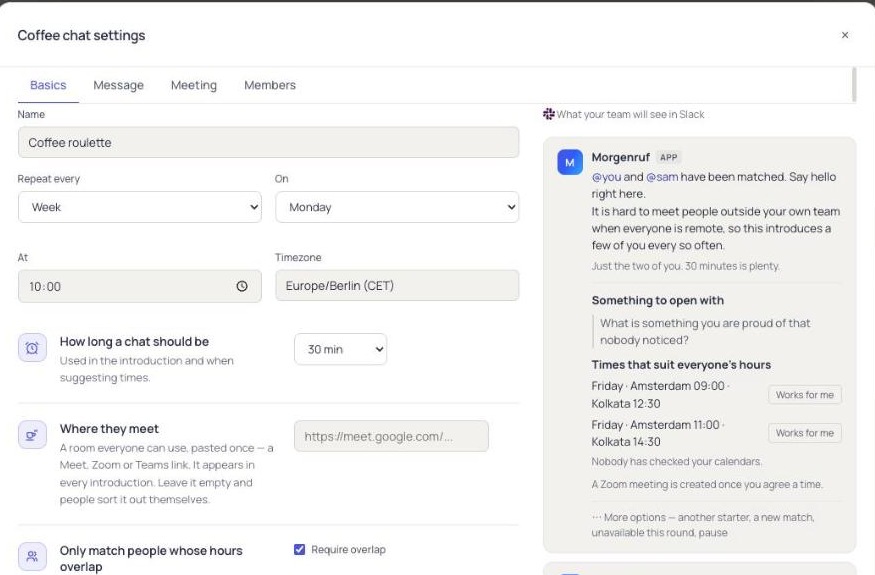
Zoom meetings 1.8.0
The pair picks an hour that suits both of them, and Zoom books it.
Google Chat beta
Standups collected and posted in Google Workspace, with the same commands.
- TodayBeing built now
Microsoft Teams
Standups and commands in Teams, beside Slack, with Adaptive Cards.
- TomorrowDesigned, not started
Calendar holds
The hour a coffee chat pair agreed lands on both calendars. Google Calendar first.
Meet and Teams rooms
A meeting room made for each pairing, the way Zoom works today.
- SomedayPlanned, open to votes
Public REST API
Script anything the dashboard can do. Reading already works through the MCP server.
Onboarding journeys
A new hire's first two weeks, with their manager nudged at the right moments.
Your database, your cluster, your rules
Postgres you control
Every standup, pairing and kudo lives in a database you own. The install talks to Slack only, plus Zoom, email (Resend), an AI provider or PostHog analytics if the operator turns those on.
Helm or Compose
A published chart at charts.morgenruf.dev, or Docker Compose on a spare machine. Migrations run themselves on start.
No open ports needed
Runs behind a Cloudflare tunnel, so a machine with no ingress controller and no public IP is fine.
Ask it questions
An MCP server with seventeen tools, so Claude, Cursor or Copilot can query your standup history directly.
Signed webhooks
HMAC-signed callbacks on every completed standup, for whatever you build next.
Switch parts off
Each feature is a module. Turn off what you do not use and it stops running and leaves the sidebar.
More on running a self-hosted standup bot, on what the MIT licence covers for an open-source standup bot, and on everything the Slack standup bot does inside Slack.
Free for every seat, and that is the whole pricing page
Add to Slack puts Morgenruf on the free hosted instance CloudDrove runs, in about two minutes. Or self-host the same MIT code with Docker Compose or Helm and pay only for the server.
Want it on your own infrastructure without running it yourself? It is built and maintained at CloudDrove, who will install and support it for you. What that covers →
The ones people actually ask
Is it really free?
Yes, for any number of people. Add to Slack installs it on the free hosted instance CloudDrove runs, in about two minutes. Or self-host the same MIT code with Docker Compose or Helm and pay only for the server and the database.
Can I run it without Kubernetes?
Yes. Docker Compose is a copy of the env file and one command, and it runs happily on a small VPS or a spare Mac mini. The Helm chart is for people who already have a cluster, not the only route.
Where does my standup data live?
On the free hosted instance, in the database CloudDrove runs for it; the privacy page says where and for how long. Self-hosted, in your own Postgres. A self-hosted install talks to Slack only, plus Zoom, email (Resend), an AI provider or PostHog analytics if the operator turns those on.
Is this a Geekbot, Donut or HeyTaco alternative?
It covers what teams use those for: async standups, random coffee chats, and peer recognition. Running one app instead of three is most of the point, along with owning the data. It is not a clone of any of them, and if something you rely on is missing, open an issue and say so.
Does it work with Microsoft Teams or Google Chat?
Google Chat is in beta: standups collected and posted, with the same commands. Teams as a platform is in progress. A Teams meeting link can already be used as a coffee chat room, which is a different thing.
Can somebody run standups without being a workspace admin?
Yes. Grants are per feature, so the team lead can own the standups while somebody else owns coffee chats, and neither of them can mint an API key or publish your standups publicly.
Will it cope with a large team?
Delivery is per person and resumable, so a big channel is a queue rather than a burst, and a restart mid-round picks up where it stopped instead of messaging everybody twice.